How Does an AI Image Generator Work? Diffusion Models Explained
You typed a handful of words – “sunset over mountains reflected in a lake” – and within seconds a breathtaking image appeared. How is that even possible? How can artificial intelligence turn abstract text into a concrete visual work?
Tools like DALL-E, Midjourney, or Stable Diffusion are more than clever programs. They are complex systems that have learned what our world looks like by training on millions of images. Let’s uncover the secrets of how they work, from the initial “noise” all the way to the final masterpiece. Once you understand what’s happening under the hood, check out the practical guide on writing prompts.
How AI Turns Noise into Art: The Magic of Diffusion Models
Picture a sculptor starting with a large, shapeless block of marble. Piece by piece they chip away, revealing rough forms, then refining every fine detail until a statue emerges. Modern AI image generators work on a remarkably similar principle.
This process is called diffusion, and it is at the heart of nearly every contemporary generator.
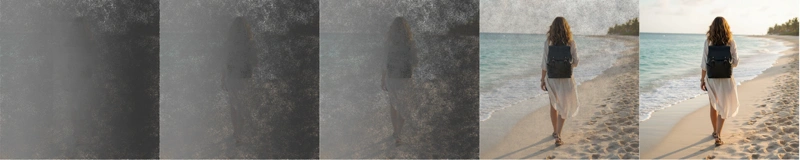
How the Sculptor Chips the Digital Marble
The entire process unfolds in several steps, all guided by your text prompt:
- Starting from chaos: Everything begins as a canvas filled with random noise – like an old TV showing static. This is our “block of marble.”
- Iterative denoising: The model runs through dozens of small steps, progressively “cleaning” the noise. More steps mean higher quality. At each step it asks: “What would this image look like with slightly less noise while still matching the description ‘cat on a rooftop’?”
- Text-guided direction: Your prompt acts as a constant compass, ensuring that what emerges from the noise is exactly the cat you asked for, not a dog or a car.
A smart shortcut: latent diffusion
Instead of working with a massive full-resolution image (computationally expensive), the AI works with a compressed, reduced-size version in what's called latent space. Think of it as sculpting a miniature instead of a giant block of marble – much faster and far more efficient.
How AI Understands What You Want: From Words to Images
The greatest magic lies in how AI grasps your text prompt and translates it into visual language. It goes far beyond keyword matching – it is a complex process of understanding meaning and relationships.
1. Decoding Your Words
First, a language model breaks your prompt down into its components. It recognizes that “flying whales” are not two separate words but a single surrealist concept. Each word and its context is assigned a mathematical fingerprint (a vector) that encodes its meaning.
2. The Library of All Ideas (Latent Space)
Imagine a vast library where every conceivable concept is organized by similarity. One corner holds everything about “cats,” right next to it a section on “dogs,” and further along a wing for “mammals.” Your prompt “orange tabby tomcat” becomes a precise point in this library – a coordinate that tells the AI exactly which shelf to reach for when seeking inspiration.
3. The Conductor Connecting Words and Pixels (Cross-attention)
How does AI ensure that the hair is red and the eyes are blue, and not the other way around? This is where the cross-attention mechanism comes in. Think of it as an orchestra conductor. Your prompt is the score. When the AI generates hair, the conductor (attention) cues the violins (the word “red”). When it generates eyes, it cues the flutes (the word “blue”). This ensures the right attribute is applied to the right part of the image.
Transformer Architecture: The Brain of the Operation
The technology that makes all of this possible is called the Transformer – a type of neural network that excels at understanding context and relationships. Unlike older models that only looked at their immediate surroundings, a Transformer sees the entire picture at once.
Analogy: assembling a mosaic
Think of assembling a mosaic. Older models (CNNs) are like someone who can only see a few tiles around them at a time. A Transformer is like someone standing back and seeing the whole image at once, understanding how every part fits into the whole.
Thanks to this global view, AI can maintain consistent lighting, style, and composition across the entire image. Models like CLIP from OpenAI act as the chief translator and referee, continuously checking whether the generated image genuinely matches the meaning of your text.
From Flickering Pixels to Photorealism
Today’s generators did not appear overnight. They are the result of decades of research and several pivotal breakthroughs.
The Early Days: First Steps
The earliest attempts were more algorithmic and abstract. Neural networks existed, but they lacked the computational power. Results were blurry and simple, yet they laid the groundwork for everything that followed.
The Era of Artistic Rivals (GANs)
In 2014, a revolution arrived in the form of Generative Adversarial Networks (GANs). They worked like a game between a forger and an expert:
- Generator (The Forger): Tried to create the most convincing image possible.
- Discriminator (The Expert): Learned to tell whether an image was real or generated by the forger.
This constant competition forced both sides to improve, producing an enormous leap in quality and photorealism. The downside was limited control over content.
The Current Revolution (Diffusion)
True democratization came with diffusion models. The year 2022 was the turning point: DALL-E 2, Midjourney, and the open-source project Stable Diffusion arrived, placing this powerful technology in the hands of the entire world.
Tricks That Push the Boundaries
Development has not stood still. New techniques keep emerging, giving us ever greater creative freedom.
ControlNet: You Are the Director
With tools like ControlNet you are no longer just the author of a text prompt – you become the director of the scene. You can upload a simple sketch, a character’s pose, or a depth map, and the AI will produce an image that precisely respects your composition.
Imagine having an exact picture in your head – where a character stands, how they are turned, where the horizon sits. Instead of relying on chance or endless regeneration, you simply sketch a rough outline and AI turns it into a photorealistic result. ControlNet supports a range of input types: from edge detection and object segmentation to normal maps for 3D relief.
This is especially useful for illustrators and concept artists who need consistency across multiple images – for example when creating a comic or storyboard. Draw a character pose once, then use it as a template for dozens of different stylizations.
LoRA & DreamBooth: Teach AI Your Style
Want the AI to generate images in your specific style, featuring your product, or even your own face? Techniques like LoRA let you “fine-tune” a model on a small set of your own images, creating a personalized generator.
LoRA (Low-Rank Adaptation) is an elegant solution that does not require retraining an entire massive model. Just 10–50 quality photographs of your product, your face, or examples of your painting style are enough, and within a few hours you can have your own specialized model. The resulting file is only a few megabytes, so you can easily share it or combine it with other LoRA models.
DreamBooth goes even further, training the model to recognize a specific subject or style with even greater precision. Perfect for brand materials – upload logos and product photos and the AI can then generate an endless stream of marketing visuals consistent with your identity. Influencers use it for content creation, graphic designers for consistent illustrations, and businesses for product visualization without the need for a photo shoot.
Inpainting & Outpainting: Magic Eraser and Infinite Canvas
AI is no longer just about creating from scratch. With inpainting you can select a region of an image and let the AI regenerate it (for example, changing the color of a car). With outpainting you can expand the canvas and let the AI invent what lies beyond the original frame.
Inpainting is like a magic retouching brush – need to remove a tourist from a holiday photo? Liven up a blank wall with an interesting painting? Change a character’s outfit? Simply mark the area and describe what you want in its place. AI does not merely erase the original content; it intelligently replaces it so everything blends with the surroundings – including correct lighting, shadows, and perspective.
Outpainting, on the other hand, breaks down the canvas boundary. Have a crop of a photo but need a wider shot? AI can naturally extend the scene in any direction. The photographer accidentally cut off the top of a tower? Let the AI figure out what should be there. A landscape shot in 4:3 ratio can become a 21:9 panorama that looks completely natural. For designers, this means never having to wrestle with the wrong source format again.
Upscaling: From Thumbnail to Poster
Modern upscalers can intelligently enlarge images from low resolution to print quality without losing sharpness. At the same time, models are continually being optimized so that you can now run them on a standard gaming PC.
Traditional image enlargement always meant a loss of quality – pixels blurred and the result looked like fog. AI upscalers, however, do not just interpolate pixels; they actively “hallucinate” missing details. They can reconstruct sharp facial features from a blurry face, or build a realistic texture from a pixelated surface. Tools like ESRGAN, Real-ESRGAN, or the newer SUPIR achieve results that would have seemed impossible just a few years ago.
And what about performance? While first-generation tools demanded professional graphics cards costing tens of thousands, today a standard gaming GPU is enough. Thanks to optimizations like xFormers, TensorRT, and model quantization, you can generate high-quality images even on a laptop with a GeForce RTX 40-series card. The community also creates “pruned” model versions – trimmed of unnecessary data, faster and leaner, yet retaining full quality. The barrier to entry has dropped dramatically, and creative tools are more accessible than ever before.
The Future That Is Already Knocking
What comes next? Development is heading toward photorealism indistinguishable from reality, perfect anatomy, and image generation in fractions of a second. A major theme is multimodality – systems that will generate not just images but entire scenes, videos (like OpenAI’s Sora), or 3D worlds from a single prompt.
With growing power comes growing responsibility. Expect advances in digital watermarking technologies to help identify AI-generated content, alongside ever-smarter filters to ensure safe and ethical use of this fascinating technology.
Want to See It in Action?
GuideGlare AI Images gives you access to Flux, Imagen, and Stable Diffusion technology all in one place.